1. Why use this guide?
Use this guide for advice on how to search for Foreign Office correspondence dating from 1782 to 1890 and now held at The National Archives. You will need to visit us to carry out a search and view the documents. For advice on other types of Foreign Office records see our broader overview guide.
Foreign Office correspondence is a rich source of information on the history of British relations with foreign states and can also provide insights into past domestic issues in foreign countries.
There are tens of thousands of records of general correspondence at The National Archives, ranging from letters, both personal and official, telegrams and despatches, to reports, notes and memos and anything else that was sent from one place or person to another in the business of the Foreign Office.
2. The essential search tools: Foreign Office indexes and registers
To identify Foreign Office correspondence from 1782 to 1890 relevant to a particular country, person or subject area, you will need to use the Foreign Office indexes and registers which make up series FO 605.
These indexes and registers were created and used by the staff of the Foreign Office itself in the 19th century – not all the correspondence to which they refer was sent for preservation to The National Archives so today some index and register entries refer to documents which no longer exist.
The indexes, registers and correspondence have not been digitised and therefore cannot be viewed online. To view them you will need to visit The National Archives or pay for research.
3. How to use the indexes and registers to find correspondence
Follow the steps below to work your way from the indexes to the registers, both on microfilm, and finally to the paper correspondence itself.
Step 1: Identify the relevant index
Use the FO 605 series search in Discovery, our catalogue, and search by country name. This will provide you with an FO 605 reference number for the relevant microfilm roll.
Some countries have several indexes split up chronologically.
Step 2: Identify the relevant entry in the index
Retrieve the relevant microfilm roll from the drawers in the Open Reading Room.
There are often several volumes of indexes per microfilm roll and the volume you need will not necessarily be the first one on the film.
The indexes are arranged alphabetically, with each page divided into two columns, ‘subjects’ and ‘persons’, as shown in this index page for correspondence about China:
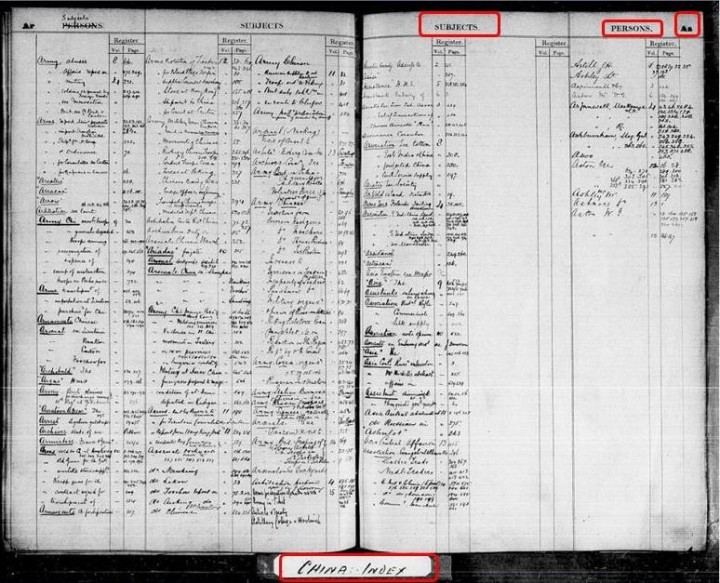
You may have to do some lateral thinking to find your way around the subject index terms used as it is not always obvious how the Foreign Office would have originally categorised a subject.
Once you have identified entries of interest, write down the corresponding registry volume and page numbers, as shown here:
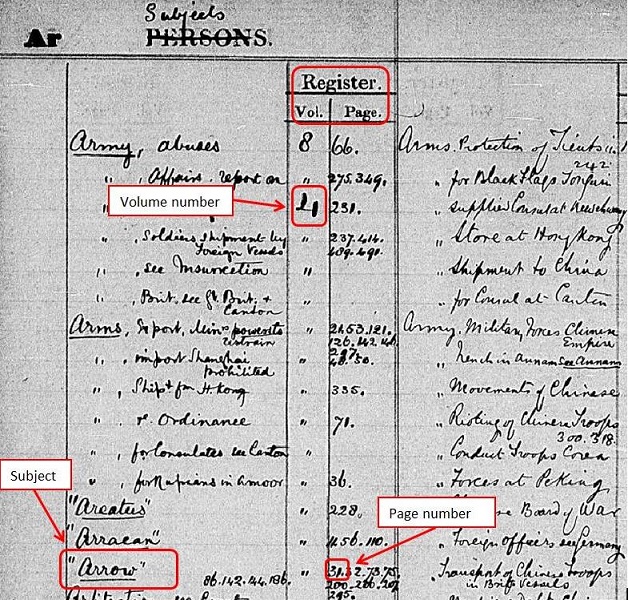
Step 3: Identify the relevant register
Use the FO 605 series search in our online catalogue to search by country name and volume number (abbreviating volume to ‘vol’). This will provide you with another FO 605 reference number for the relevant microfilm roll, as in these search results of a search for Volume 4 of the register for China:
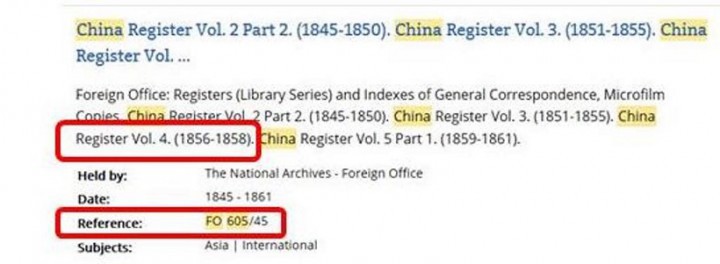
One of the results of an FO 605 series search in Discovery
Step 4: Identify the relevant entry in the register
Retrieve the relevant microfilm roll from the drawers in the Open Reading Room.
Scroll through the microfilm until you reach the relevant volume (the volume number appears at the bottom of the page) and the relevant page (the page number appears in the top corner, above the line).
The register will provide you with:
- The original correspondence volume number
- The despatch number
- The subject
Entries in red ink are for telegrams.
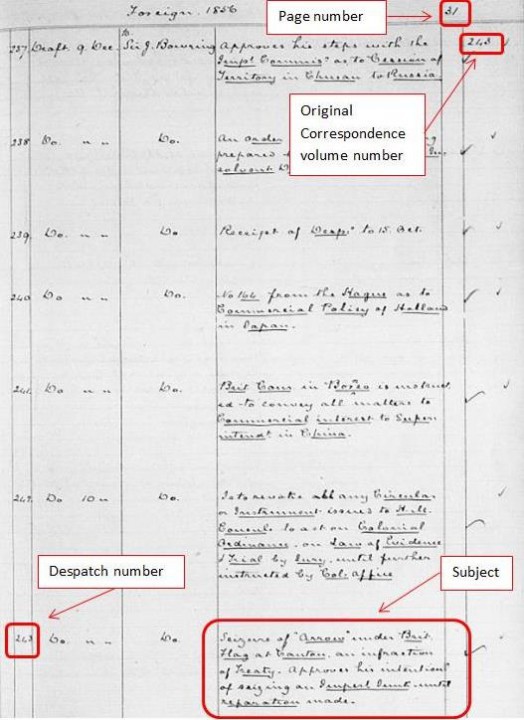
A typical page from a Foreign Office register
Step 5: Find the relevant despatch
You will first need to identify the original correspondence record series for your country. To do so, you can:
- Use the list of correspondence series by country in our catalogue
- Ask for the printed list at the enquiries desks in the Open Reading Room
Once you have established the relevant series (for China, for example, it’s FO 17) you will need to establish the piece number within it – you do this simply by adding the original correspondence volume number to the series reference, separated by a forward slash (thus the full reference for volume 243 of original correspondence about China is FO 17/243).
You can now locate this reference in our online catalogue, as shown here:
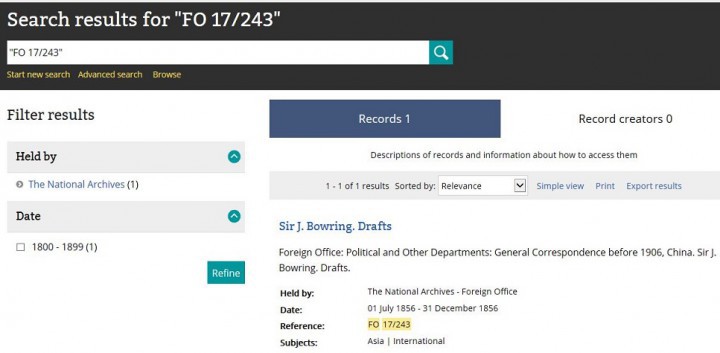
Search results page in Discovery, our online catalogue, showing the result of a search for FO 17/243
By clicking on the title of the relevant volume in your catalogue search results you can order it and look for the despatch within it.
4. Further reading
Some of the publications below may be available to buy from The National Archives’ bookshop. Alternatively, search The National Archives’ library catalogue to see what is available to consult at Kew.
James Cronan and Keith Mitchell (eds.), ‘Foreign Office Records, 1782 to 1986: An index to country series’ (Lists and Index Society, 2017)
Michael Roper, ‘The records of the Foreign Office, 1782-1968′ (Public Record Office Publications, 2002)
L Atherton, ‘Never complain, never explain’: Records of the Foreign Office and State Paper Office 1500-c.1960’, Public Record Office Readers’ Guide No.7 (PRO publications, 1994)
‘The records of the Foreign Office, 1782-1939’, Public Record Office Handbooks No.13 (HMSO, 1969)
1. Why use this guide?
Use this guide for advice on how to search for Foreign Office correspondence dating from 1891 to 1905 and now held at The National Archives. You will need to visit us to carry out a search and to view the documents. For advice on other types of Foreign Office records see our broader overview guide.
Foreign Office correspondence is a rich source of information on the history of British relations with foreign states and can also provide insights into past domestic issues in foreign countries.
There are tens of thousands of records of general correspondence at The National Archives, ranging from letters, both personal and official, telegrams and despatches, to reports, notes and memos and anything else that was sent from one place or person to another in the business of the Foreign Office.
2. The essential search tools: Foreign Office indexes and registers
To identify the Foreign Office correspondence from 1891 to 1905 relevant to a particular country, person or subject area, you will need to use the Foreign Office indexes which make up series FO 804 (you can also search in FO 738 which contains photographic copies of the volumes held in FO 804) and the registers in series FO 566.
These indexes and registers were created and used by the staff of the Foreign Office itself – not all the correspondence to which they refer was sent for preservation to The National Archives so today some index and register entries refer to documents which no longer exist.
Neither the indexes, registers or correspondence have been digitised and therefore cannot be viewed online. To view them you will need to visit The National Archives, or pay for research.
3. Using the indexes and registers to find correspondence
Follow the steps below to work your way from the indexes to the registers and finally to the paper correspondence itself. None of the indexes, registers or correspondence are available to view online or on microfilm so you will need a readers ticket to order and view them in person at our building in Kew. Our page on researching at The National Archives explains more.
Step 1: Identify and order the relevant index in FO 804
Use the FO 804 (or FO 738) series search in our catalogue to search by country name, as shown below:
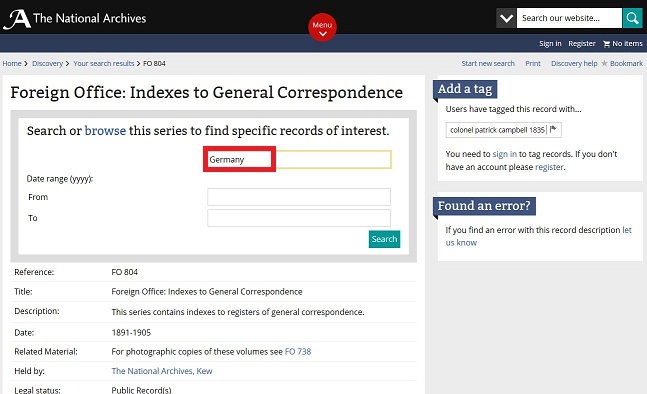
A search for the Germany index in the FO 804 series search
From the results of your search, select the appropriate reference, like the one shown below, so you can order the index for viewing in our Document Reading Room.
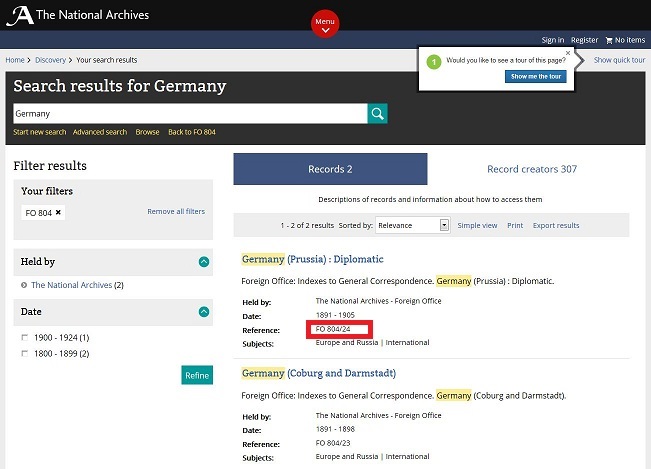
Catalogue search results page showing the results of a search for Germany in FO 804
Step 2: Identify the relevant entry in the index
The indexes are arranged alphabetically, with each page divided into two columns: ‘subjects’ and ‘persons’.
The index will provide you with the year and the page number of the register you need to look at, as shown below.
You may have to do some lateral thinking to find your way around the subject index terms used.
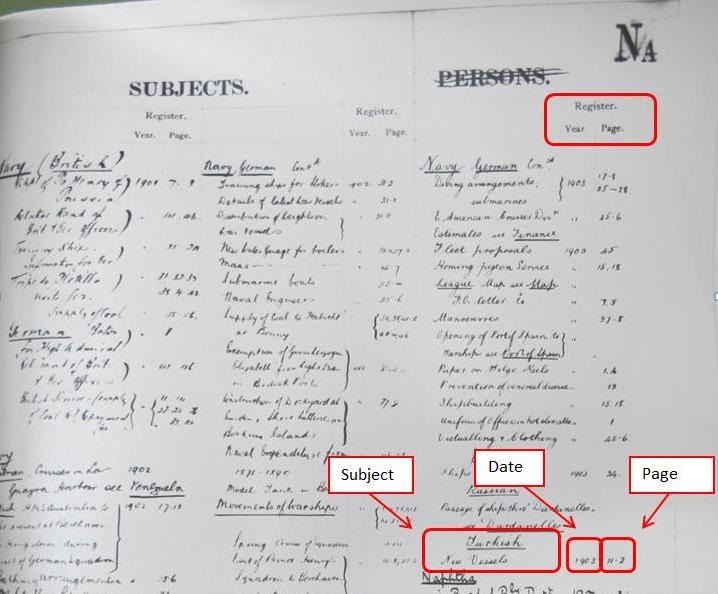
Page from a Foreign Office index
Step 3: Identify the relevant register
Use the FO 566 series search in our catalogue to search by country name and year.
The registers are often split into separate volumes (Diplomatic, Consular, Commercial and Treaty) and this will be evident in search results. The Diplomatic registers are those most commonly used, but, depending on your subject, it may be worth ordering the others as well. The reference for the Diplomatic register for Germany is shown below:
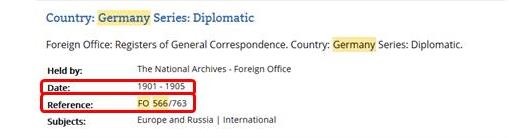
Cut-away of a catalogue search results page showing the reference for the Diplomatic register for Germany
With a reference you can order the relevant register for viewing in our Document Reading Room.
Step 4: Identify the relevant entry in the register
Go to the relevant year and page in the register (the page number appears in the top corner, above the line), and identify the subject you are looking for.
The register will provide you with:
- author
- despatch number
- subject
Entries in red ink are for telegrams.
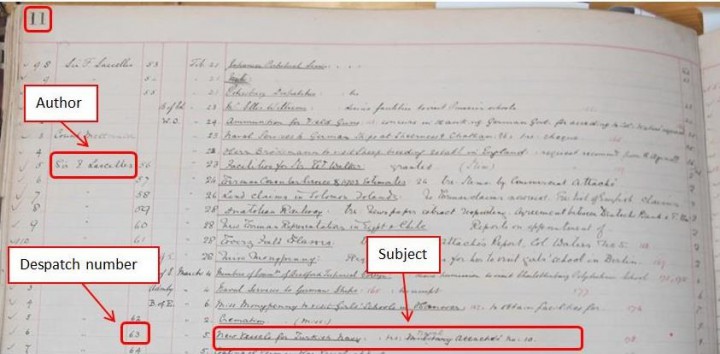
Page from a Foreign Office register
Step 5: Find the relevant despatch
You will first need to identify the original correspondence series for your country. To do so, you can:
- use the list of correspondence series by country in our catalogue
- ask for the list at the enquiries desk in the Open Reading Room
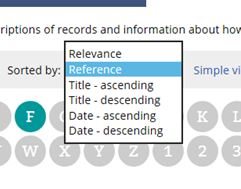
The drop down list on catalogue search results pages that allows you to sort results by reference
Use the advanced search in our catalogue, leaving the keyword box blank and restrict to the relevant country series and year.
Using the drop down menu (shown on the left), sort your results by reference.
Then look for the volume which contains despatches from the author you have identified, and look for the range that contains your despatch number (like the registers, the correspondence can be split into Diplomatic, Consular, Commercial and Treaty).
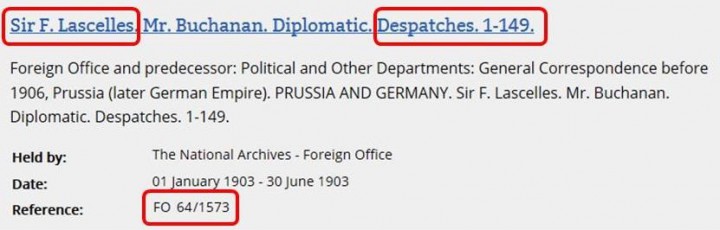
Cut-away from a search results page in the online catalogue showing the document reference for the 1903 volume of correspondence that includes Despatch 63
You can then order the relevant volume and look for the despatch within it.
4. Further reading
Some of the publications below may be available to buy from The National Archives’ bookshop. Alternatively, search The National Archives’ library catalogue to see what is available to consult at Kew.
James Cronan and Keith Mitchell (eds.), Foreign Office Records, 1782 to 1986, An index to country series (Lists and Index Society, 2017)
Michael Roper, The records of the Foreign Office, 1782-1968 (Public Record Office Publications, 2002)
L Atherton, ‘Never complain, never explain’, Records of the Foreign Office and State Paper Office 1500-c1960, Public Record Office Readers’ Guide No7 (PRO publications, 1994)
The records of the Foreign Office, 1782-1939, Public Record Office Handbooks No13 (HMSO, 1969)
1. Why use this guide?
Use this guide for advice on how to search for specific items of Foreign Office and Foreign and Commonwealth Office correspondence from 1920 onwards. The Foreign Office became the Foreign and Commonwealth Office in 1967. For advice on other types of Foreign Office records see our broader overview guide.
Foreign Office correspondence is a rich source of information on the history of British relations with foreign states and can also provide insights into past domestic issues in foreign countries.
There are tens of thousands of records of general correspondence at The National Archives, ranging from letters, both personal and official, telegrams and despatches, to reports, notes and memos and anything else that was sent from one place or person to another in the business of the Foreign Office.
You can do most searches online but you will usually need to visit us to view the correspondence itself.
2. Online and published records
A small proportion of Foreign Office and Foreign and Commonwealth Office correspondence has been reproduced in published volumes and online (see Further reading). This may provide an easier method of accessing the records than consulting the original documents and will allow you to bypass the search steps explained in this guide.
3. The Foreign Office Index
Correspondence received by the Foreign Office was numbered and categorised. Each category now has a corresponding National Archives record series.
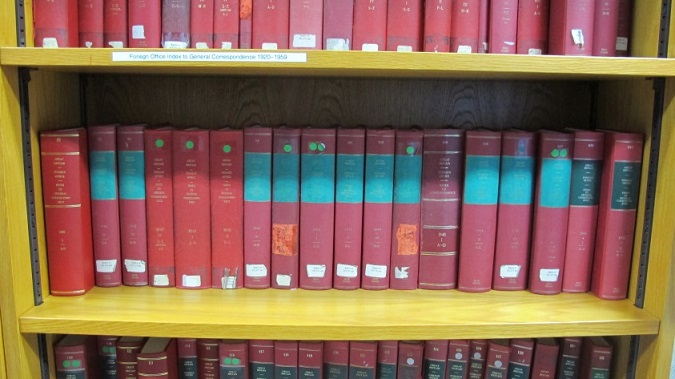
A section of the Foreign Office index for correspondence 1920-1953 and 1959
To identify records by subject or author within these categories from 1920 to 1953 and 1959, you need to use the Foreign Office index (FO 409). This 150-volume index (shown on the right) is available in the Open Reading Room at our building in Kew and can also be downloaded and viewed online for free.
The index was created and used by the staff of the Foreign Office itself but not all the correspondence to which it refers was sent for preservation at The National Archives. Some index entries, therefore, refer to documents that have not been kept. If a document has not been preserved in Foreign Office correspondence, it may survive in the form of confidential prints – our broader guide to Foreign Office records explains more.
From 1954-1958 and from 1960 onwards The National Archives does not have any registers or indexes. Read section 5 of this guide for advice on how to find correspondence from these years.
4. Finding correspondence from 1920-1953 and 1959
To find correspondence from 1920 to 1953 and 1959, you need to use the Foreign Office index (FO 409).
4.1 How to use the Foreign Office index to find correspondence
Step 1: Identify an index entry of interest
Start by looking for the relevant section of the FO 409 index. It is arranged by year, and then alphabetically.
You will need to decide on a keyword and begin your search with the first letter of your keyword. You may have to do some lateral thinking to find your way around the terms used in the subject index. It is not always obvious how the Foreign Office would have originally categorised the subjects.
To search for correspondence relating to the Berlin Airlift in 1948, for example, your search in the online version of FO 409 could begin as follows:
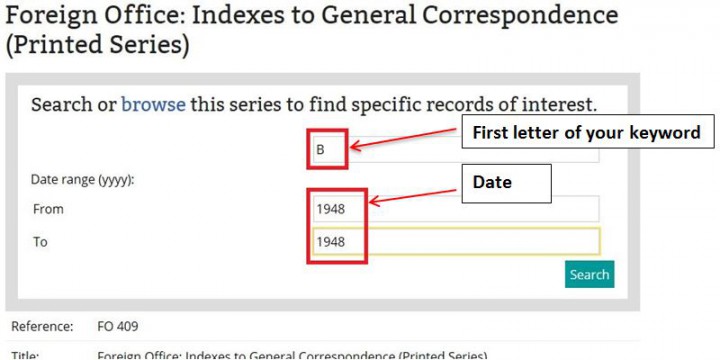
A search in series FO 409, the Foreign Office index, on The National Archives catalogue
Step 2: Note the country code, file number and paper number from the index
A typical index entry looks like this:
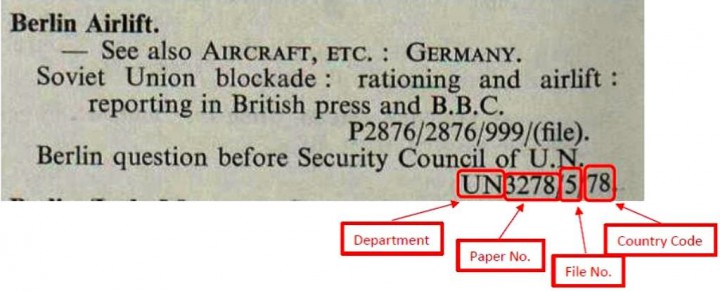
Reading the reference from right to left, the first number is the country code (see section 4.2 for advice on country codes with more than two digits), the second number is the file number and any other number will be a paper number, as shown above. The department code is not needed for an online search but it can sometimes prove useful to know – and is vital when searching using the paper version of the catalogue.
Step 3: Convert the Foreign Office references to National Archives references
Use the advanced search in our catalogue to search using the country code prefixed by the word ‘code’, all in speech marks, and refine your search to FO (Foreign Office records) and the relevant year, like this:
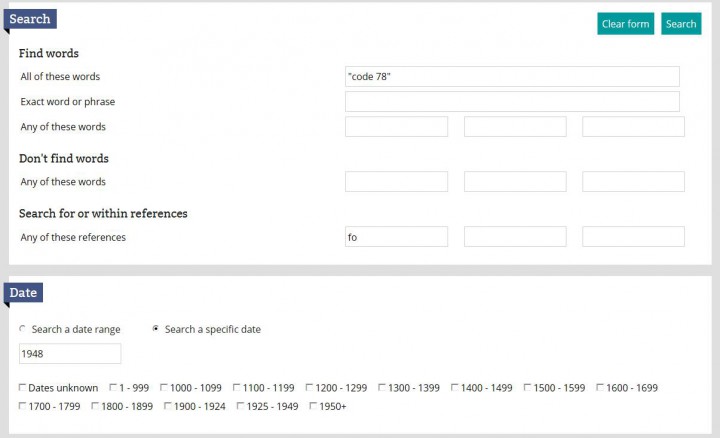
A search for “code 78” in Foreign Office records from 1948 using the advanced search in The National Archives catalogue
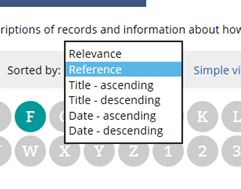
The dropdown list on catalogue search results pages that alllows you to sort results by reference
Step 4: Identify the relevant National Archives reference
Use the dropdown list to sort your search results by reference – this will present results in file and paper number order, allowing you to easily find the FO reference covering the paper and file number from your index entry.
You can now order and view the correspondence.
4.2 Country codes with more than two digits (category codes)
Country codes generally have two digits, but extra numbers were sometimes added to indicate which category the papers were placed in. If your country code has three digits, please refer to the table below:
| Country/category code | Years | FO series | Type |
| xx (no prefix) | From 1920 | FO 371 | Political |
| 1xx | 1920-1939 | FO 395 | News |
| 2xx | From 1920 | FO 369 | Consular |
| 3xx | From 1920 | FO 372 | Treaty |
| 4xx (below 450) | From 1945 | FO 370 | Library |
| 4xx | From 1944 | FO 924 | Foreign Research |
| 4xx (above 450) | From 1945 | FO 924 | Cultural Relations |
| 5xx | 1930-1943 | FO 366 | Chief Clerk / Establishment and Finance |
| 6xx | From 1927 | FO 850 | Communications |
| 7xx | 1929-1933 | FO 627 | Dominions Information |
| 9xx | From 1945 | FO 953 | Information policy |
5. Finding correspondence from 1954-1958 and from 1960 onwards
5.1 Correspondence from 1954-1958 and 1960-1966
The National Archives does not have any registers or indexes for these years.
To find correspondence from these years you should search our catalogue by keyword using the advanced search:
- the keyword would typically be a country or sometimes a person
- ensure FO is inserted into the “Search within references” box
- remember to include the year or year range in the “Date” section
5.2 Correspondence after 1966
In 1967, the registries of the Commonwealth Office and the Foreign Office were merged, more than one year before they themselves were combined as the Foreign and Commonwealth Office. From this point, the records are arranged in regional geographical groups or subject groups reflecting their departmental organisation.
Click on the series codes below to search within those series by keyword and year.
The geographical general correspondence series are:
| Region | Series |
|---|---|
| Europe | FCO 9 (Southern Europe), FCO 28 (Eastern Europe and USSR), FCO 33 (Western Europe), FCO 87 (Republic of Ireland from 1972) |
| The Americas and Atlantic | FCO 7 (America and Latin America), FCO 42 (Gibraltar and South Atlantic to 1971), FCO 44 (West Indies to 1972, West Indies and Atlantic from 1972), FCO 63 (North America and Caribbean to 1969, Caribbean from 1969), FCO 82 (North America from 1971), FCO 83 (Atlantic and Indian Ocean 1971-72), FCO 86 (Gibraltar from 1972), FCO 99 (Mexico and Caribbean from 1977) |
| Africa | FCO 29 (Central Africa 1968-69), FCO 31 (East Africa), FCO 36 (Rhodesia), FCO 39 (North Africa to 1972, Near East and North Africa 1972 only), FCO 45 (Southern Africa to 1969, Central and Southern Africa from 1969), FCO 65 (West Africa), FCO 93 (Near East and North Africa from 1972) |
| Middle East | FCO 8 (Arabia to 1972, Middle East from 1972), FCO 17 (Near East to 1972, Near East and North Africa 1972-73), FCO 39 (Near East and North Africa 1972 only), FCO 93 (Near East and North Africa from 1972) |
| South Asia and Indian Ocean | FCO 32 (Pacific and Indian Ocean to 1971), FCO 37 (South Asia), FCO 40 (Hong Kong and Indian Ocean from 1972), FCO 83 (Atlantic and Indian Ocean 1971-72) |
| Far East, South East Asia and Pacific | FCO 15 (South East Asia), FCO 21 (Far East), FCO 24 (South West Pacific), FCO 32 (Pacific and Indian Ocean to 1971, Pacific Dependent Territories from 1972), FCO 40 (Hong Kong to 1972, Hong Kong and Indian Ocean from 1972) |
The subject general correspondence series are in:
| Subjects | Series |
|---|---|
| Economic, Transport and Communications Departments | FCO 14, FCO 30, FCO 35, FCO 59, FCO 67, FCO 69-71, FCO 74, FCO 76, FCO 96, FCO 98 |
| Defence and Disarmament Departments | FCO 10, FCO 16, FCO 41, FCO 46, FCO 66 |
| Cultural, Development and Scientific Departments | FCO 13, FCO 34, FCO 48, FCO 55 |
| Consular, Migration, Treaty, Protocol and Claims Departments | FCO 47, FCO 50, FCO 53, FCO 57, FCO 64 |
| United Nations | FCO 61 |
| Administrative, Information, Research and Central Policy Departments | FCO 12, FCO 26, FCO 49, FCO 51-2, FCO 56, FCO 68, FCO 72, FCO 86, FCO 95 |
| 1977 Conferences (EEC, NATO, Commonwealth) | FCO 104 |
6. Further reading
Some or all of the publications below may be available to buy from The National Archives’ bookshop. Alternatively, search The National Archives’ library catalogue to see what is available to consult at Kew.
Published copies of records:
- British Documents on the Origins of the War, Documents on British Foreign Policy, Documents on British Policy Overseas (13, 68 and 18 Volumes respectively, HMSO and Routledge, 1926 onwards). Selections of documents (mostly general correspondence) covering the build up to the First and Second World Wars and the Cold War respectively
- British Documents on Foreign Affairs (over 200 volumes, University Publications of America, 1983 onwards). Selection of Confidential Prints from mid-19th to mid-20th century
- British and Foreign State Papers (168 Volumes, HMSO 19th century to 1977). Published copies of major treaties from 1812 to 1967
- Adam Matthew Digital offers various packages relating to foreign issues
- Secret Files from World Wars to Cold War (Intelligence and Foreign Policy files 1873-1953)
Secondary material:
- James Cronan and Keith Mitchell (eds.), Foreign Office Records, 1782 to 1986, An index to country series (Lists and Index Society, 2017)
- FCO Historians, A guide to researching FCO history (Foreign and Commonwealth Office)
- Michael Roper, The Records of the Foreign Office, 1782-1968 (Public Record Office, 2002)
- Louise Atherton, Never Complain, Never Explain: Records of the Foreign Office and the State Paper Office 1500-c.1960 (Public Record Office, 1994), includes well-explained guidance on how to use the registers and indexes to Foreign Office correspondence
1. Why use this guide?
This guide introduces sea charts and explains how to find them at The National Archives, as well as detailing other useful sources and institutions.
2. What are sea charts?
Sea charts are maps for navigation at sea, describing seas, rivers and coasts in many parts of the world. Some show man-made features such as harbours and shore defences. They often include the best and most easily accessible maps of small oceanic islands.
Most show high and low water marks and the depth of water (also known as soundings). Many record navigational hazards such as reefs and wrecks, and navigational aids including lights, buoys and beacons. Though few contain information on areas inland of the foreshore, features which were useful in entering harbour or making landfall are sometimes included, as well as and coastal elevations and topographic views. In addition Admiralty charts from the 19th century may depict sites of archaeological interest, coastal forts and defences, and natural features.
Many sea charts have a compass indicator, and earlier ones often have an elaborate compass rose. Most also have some indication of scale such as a scale bar or representative fraction, or a border showing degrees of latitude and longitude.
3. Sea charts in our collection
We hold many different types of sea charts in both manuscript and printed form. Most were used by the government and armed services, and many bear manuscript annotations and amendments relating to their use.
Maps and charts are original documents which can be viewed in our reading rooms. They are not available to download or view online.
Admiralty charts (1800-)
The Hydrographic Department was established in 1795 as a sub-department of the Admiralty, and issued its first official chart in November 1800.
Manuscript charts and early printed charts
Charts printed before 1800, including those which were published commercially, as well as charts drawn by officers and seamen throughout history.
Records from the United Kingdom Hydrographic Office
Related records are being transferred from the United Kingdom Hydrographic Office, and some are available to order and view in our reading rooms.
4. Where to start
Discovery, our catalogue
Search for sea charts by keyword in our catalogue. Sea charts are distributed throughout our collection, though records of the following departments can be particularly useful:
- Admiralty
- United Kingdom Hydrographic Office
- Colonial Office
- Foreign Office
- War Office
- Cabinet Office
Speculative keyword searches may also reveal sea charts as well as documents relating to their creation and use. See below for a list of useful document series.
Finding aids in our reading rooms
Consult the following finding aids in the Map and Large Document Reading Room:
- The four-volume published catalogue of maps and plans in the Public Record Office, arranged topographically
- A partial card index to British Admiralty Charts, arranged by chart order
- The summary calendar of uncatalogued maps (look under the heading ‘Charts: Admiralty’ in the accompanying subject index)
Sea charts elsewhere in our records
Many charts have not yet been individually catalogued and remain to be discovered within ships’ logs, Admiralty station records and other documents. For this reason none of these catalogues or finding aids is fully comprehensive.
Please let us know if you find an unrecorded chart, either by speaking to a member of staff or by filling in the online form titled ‘found and error’ next to the catalogue description.
5. How to find Admiralty charts (1800-)
Admiralty charts may include editions, states and printed amendments not represented elsewhere, although most are of standard issue. Place names and names of coastal features were often recorded, some of which are no longer in use. Some contain details of coastal harbours and surveys of navigable rivers, and their depictions of small oceanic islands can be particularly valuable.
Many charts bear manuscript additions and amendments relating to their use. Individual charts may also accompany correspondence indicating errors or suggesting amendments. As well as complete charts our collection includes portions which were cut away and used to illustrate a particular point. Military and civilian personnel sometimes traced or copied charts in the course of their duties and examples of these also survive.
Admiralty charts were continually updated to ensure they remained accurate and useful, and obsolete charts were destroyed because they presented a navigational hazard. Dates of survey and compilation were carefully recorded as well as those of any corrections. Corrections were often made by modifying the copperplates from which the chart was printed and re-publishing it as a new edition; in other cases the chart was completely re-drawn.
Published Admiralty charts often drew on older surveys, particularly in the early years of the Hydrographic Office, which in extreme cases meant that some charts were based on surveys made more than a century earlier.
Searching by place name or geographical area
Admiralty charts can be found by searching our catalogue in various ways:
- By place names, using broad search terms like “English Channel” rather than names of towns or other features
- Using keywords, like “Australia AND chart AND Admiralty”
- By date, for greater precision, using the advanced search function
These methods will also find any tracings, partial charts and records relating to charts which have been catalogued in detail.
Read our Discovery help pages for more advice.
The four-volume published catalogue “Maps and Plans in the Public Record Office, Summary Catalogue and Supplementary Map Catalogue (card index)” contains descriptions of charts alongside those of other kinds of maps and is arranged topographically, making searches by geographical area relatively straightforward.
Searching by Admiralty chart number
Search the numerical card index to Admiralty charts in the Map and Large Document Reading Room. This includes many charts which are not yet described in our online catalogue. Each card provides:
- A brief indication of the geographical area covered by the chart
- The chart’s document reference
But be aware that it does not provide:
- Dates of survey
- Dates of publication or revision
- Details of partial charts, tracings or copies
The card index is cross-referenced to paragraphs of the published catalogues “Maps and Plans in the Public Record Office, volume 2: America and West Indies [AM]” and “Volume 3: Africa [AF or AFR]” which provide fuller descriptions of the charts. An index to charts included in the published catalogue “Maps and Plans in the Public Record Office, volume 4: Europe and Turkey” is included within the volume.
Admiralty charts were initially identified by a title which described the area covered. Since 1839 each chart has also been assigned a number, printed in the bottom right hand corner of each sheet, and this number is now considered to be the primary reference indicator for the chart. Some chart numbers include letter prefixes and suffixes.
Because the Admiralty often re-used chart numbers, remember to check that the area indicated on the card index corresponds to that which you are looking for. For example chart 483 has at different times related to a chart of St. Jago in the Cape Verde islands and to Thursday Island in the Torres Straits off the north coast of Australia, and chart number 695 has been used for both the Cook Straits and for Madagascar.
The subject index volumes of the Summary Calendar of Maps and Plans contain lists of charts under the heading ‘Charts: Admiralty’. These include some charts not yet listed in our catalogue, published catalogues or the card index.
Key records
The following records series contain significant numbers of Admiralty charts; click on the links to search them in our catalogue.
| Series | Description |
| ADM 1 | Admiralty and Secretariat Papers 1660-1976 |
| ADM 7 | Admiralty and Secretariat Miscellanea 1563-1953. The case files relating to the search for Sir John Franklin include numerous successive editions of early charts of Arctic America |
| ADM 116 | Admiralty and Secretariat Cases: 1852-1960 |
| ADM 137 | War of 1914-1918: Admiralty Historical Section: Packs and Miscellaneous Records 1860-1925 |
| ADM 199 | Admiralty: War History Cases and Papers: 1939-1956 |
| ADM 231 | Admiralty: Naval Intelligence Reports 1883-1965. Charts illustrating reports on foreign naval strength, coastal defences and so on |
| ADM 352 | Admiralty: Hydrographic Department: Original Surveys 1713-1831. This series is accruing |
| CAB 11 | Committee of Imperial Defence: Colonial/Overseas Defence Committee: Defence Schemes 1863-1939. Charts illustrating memoranda and instructions to Colonial Governors and officers commanding, concerning schemes for local defence, port regulations and so on |
| CO 700 | Colonial Office: Maps and Plans: Series I 1595-1927 |
| CO 1047 | Colonial Office: Maps and Plans: Series II 1779-1947 |
| CO 1054 | Colonial Office: Maps and Plans: Post -1940 Collection 1897-1984. Includes items which accrued in the Foreign Office after 1940 |
| FO 925 | Foreign Office: Maps and Plans: 1700-1940 |
| WO 32 | War Office: Registered Files: General Series: 1845-1985 |
| WO 78 | War Office: Maps and Plans: 1627-1953. Include numerous Admiralty charts annotated to show the location and effectiveness of coastal defences |
| WO 192 | Fort Record Books: 1892-1957. Many of the books that relate to coastal forts contain Admiralty Charts |
In addition many Admiralty station records, ships’ logs, Colonial Office and Foreign Office original correspondence series, and Embassy and Consular archives are known to contain Admiralty charts.
The surviving original artwork for the views and sketches of coasts and rivers that appear on many Admiralty charts is held as a discrete collection in ADM 344.
6. How to find manuscript charts and early printed charts
The early hydrographic charts in our collection include:
- Medieval portolans (navigational charts based on compass points)
- Manuscript pilot books
- Printed charts from the 17th and 18th centuries, both as individual sheets and in atlas form
Only one portolan has so far been identified in our collection; it shows the eastern Mediterranean and part of the Black Sea, and its document reference is MPB 1/38.
By the 17th century printed charts and pilot books were being commercially published. Our collection includes many printed charts from the 17th and 18th centuries, both as individual sheets and in atlas form. The atlases are catalogued by country, continent and word heading and are therefore best searched using those terms. Bear in mind that the sheets within an atlas may not be individually catalogued.
Early printed charts are known to exist within the following record series (click the links to search our catalogue):
| Series | Description |
| SP 112 | The State Paper Office map collection: c1590 – c1888 |
| WO 78 | The War Office map library: 1627 – 1953 |
| ADM 7 | Admiralty miscellanea: 1563 – 1956 |
| ZMAP 2 and ZMAP 3 |
Library classes of atlases: 1684 – 1906 |
Naval officers and seamen continued to draw charts by hand into modern times. The Hydrographic Department original surveys in series ADM 352 contain many manuscript charts dating from the 18th and 19th centuries, which were often used as the basis for published Admiralty charts. Charts were also drawn by hand into ships’ logs and journals; for example the records of voyages of exploration (including those of Captains Cook and Bligh) in series ADM 55 include many charts.
7. Records from the United Kingdom Hydrographic Office
The following Hydrographic Office records have been transferred into our collection:
- Original surveys, which formed the basis for published British Admiralty Charts, in series ADM 352. They date from the 17th to early 19th centuries and include foreign charts gathered by surveyors in the Royal Navy
- Original artwork of the coastal and riverine views that appear on many Admiralty charts, in ADM 344
- Ships’ remark books, which record voyages, often with an emphasis on navigation, in record series ADM 346
Other records are due to be transferred, including:
- Correpondence
- Minute books
- Other original artwork
Former Hydrographic Office references can be searched using the ‘search for or within references’ field within the advanced search function of our catalogue.
8. Sea charts and copperplates in other archives
The national record set of Admiralty charts is maintained by the Hydrographic Office, which remains an authorised place of deposit for its own records. It holds an almost complete set of printed Admiralty charts, as well as many related records, including original surveys.
The largest readily accessible collections of Admiralty charts are held by the map department of the British Library and the other legal deposit libraries. If you require a large number of charts, or specific editions, it is best to use these collections:
The National Maritime Museum has a large collection of Admiralty charts and some original surveys. The Royal Geographical Society also holds a significant (but incomplete) collection of Admiralty charts.
Admiralty copperplates were formerly held by the Hydrographic Office and six can still be seen there. The others have been deposited in appropriate national institutions, including the National Maritime Museum and the British Library. Most of the plates (including the surviving plates by Dalrymple and Horsburgh) were presented to the Admiralty Library, which also keeps a list of all the plates and details of where they can be found.
9. Further reading
The following publications are available in The National Archives’ Library:
Vice-Admiral Sir Archibald Day, The Admiralty hydrographic service 1795-1919 (HMSO, 1967)
Rear-Admiral G S Ritchie, The Admiralty chart: British naval hydrography in the nineteenth century (1967, new edition 1995)
Admiralty manual of hydrographic surveying (HMSO, 1938)
M Chriss and G R Hayes, An introduction to charts and their use (third edition, 1964)
Derek Howse and Michael Sanderson, The sea chart: An historical survey based on the collections of the National Maritime Museum (1973)
A H W Robinson, Marine cartography in Britain: A history of the sea chart to 1855 (1962)
Peter Whitfield, The charting of the oceans: Ten centuries of maritime maps (1996)
Maps and Plans in the Public Record Office British Isles (1967)
Maps and Plans in the Public Record Office America and West Indies (1974)
Maps and Plans in the Public Record Office Europe and Turkey (1998)
Maps and Plans in the Public Record Office Africa (1982)
10. Related guides
Maps and Plans of Lands Abroad
When we refer to digital records, we mean records that you can view on a computer screen, whether a desktop, laptop, tablet or mobile phone screen. Digital records exist either because a digital version has been made of a paper record or because they were ‘born-digital’.
Many of the paper records at The National Archives have digital versions, such as Royal Navy service records or pre-1858 wills.
The paper versions were scanned and then those scanned images made available on our website.
This allows anyone with access to our website to view records online and, in most cases, download them to their computer, without having to come to our building in Kew, where we keep the original paper versions.
However, as time goes on an increasing number of records at The National Archives will be born-digital.
Born-digital records are records that were created originally in a digital format. They are mainly text-based documents such as word-processed documents, spreadsheets, presentation slides and emails but can also be videos, 3D models and photographs.
| Term | Definition |
| Archive (held by) | This is the organisation which holds the records – the may be known variously as record offices or repositories. |
| Catalogue reference | see Document reference |
| Department code | The highest level of The National Archives’ catalogue hierarchy, determined by the government department which held the records prior to The National Archives. Examples include Ministry of Health, War Office and Treasury. |
| Division | An administrative section of a department, one level down. |
| Item | Part of a ‘piece’; an item can be a page, a folder or a bundle of papers. Note that only a minority of records have been described to this level and therefore not all documents have an item number. |
| Piece | Usually the level at which a reference becomes an orderable or viewable unit. A piece can be a folder, file, volume or box of documents. |
| Record creator | The institution or person that originally created a record (often not the same as the institution or person that currently holds the record). For example, the Brookwood Cemetery burial registers were created by the London Necropolis Company and are held in the Surrey History Centre. |
| Document reference | Every document held at The National Archives and other archives and institutions has a unique code, known as a document reference. Document references at The National Archives are usually in three parts. For example WO 95/234 – WO is the department, 95 is the series and 234 is the piece. References used by other archives may look different but follow a similar pattern, such as COL/CN/05/018 or LINCOLN PRISON 1. |
| Series | The main grouping of records with a common function or subject. Archive documents maintained as a unit because they result from the same activity or filing process or have a particular form; or because of some other relationship arising from their creation, accumulation or use. |
| Subject | Lists the subjects that the records have been tagged by, for example, railway, education, battles and conflicts. |
| Sub-series | A smaller grouping of records with a common function or subject. |
| Sub sub-series | A smaller grouping of records with a common function or subject. |
The ‘Find an archive‘ page allows you to search by location or keyword specifically for archives themselves, as opposed to the records they hold.
Search results will show you:
- contact information for the archive
- brief information about the archive’s collection
- a map showing the location of the archive
Sometimes the map doesn’t appear – try using a different browser if this happens.
You can search for over 2,500 archives across the UK and some abroad but only those overseas archives that hold a significant collection of records relating to the UK are included.
To find an archive in the UK you can:
- use the search box
- click on the map
- select from a list of UK regions and counties
To find archives outside the UK you can select from lists of countries arranged alphabetically.
The different search options are explained below.
1. Find an archive in the UK and beyond
Use the search box to find archives by place, name or theme:
- to see what archives there are in Birmingham, enter ‘Birmingham’
- to find archives specialising in railways, enter ‘Railways’
- to find an archive you know the name of, enter the name
2. Find an archive using the map
Click on an area of the UK to see an alphabetical list of archives within the region.
Use the filters to refine your list by more precise location and/or by type of archive.
3. Find an archive using regional lists
Choose a home nation
Click on one of the headings to see an alphabetical list of all archives within that nation.
You can refine your results using the filters for location and/or type of archive.
Choose a region in England
Click on the drop down list to see the English regions. These are the same as those shown on the map.
Click on a region to see a list of counties within it. You can then either:
- click on a specific county to see the archives within it, or
- choose the option at the top of the list to show a breakdown of all the archives within the region if you don’t want to choose a specific county
Once you have a list of archives within a region or county you can refine your results using the filters for location and/or type of archive.
4. Find archives by country
Click on a letter to see a list of archives by country. Only archives with a significant collection of records relating to the UK are included.
Within the list of archives from a specific country you can refine your results by type of archive. If you choose England from the list you will also be able to refine your results by location.
5. Find archives by ARCHON code
If you know the ARCHON code simply enter it into the search box to get contact details for that archive.
Sorting can help you to:
- pick out the results that match your search criteria most closely
- make a large number of results easier to work with
1. Simple and detailed view options
In the records tab you can display your search results in ‘detailed’ or ‘simple’ view. Click on these options at the top of the results list to move between them.
Detailed view is the default way that your results will be displayed. Each result includes the title and usually a short description of the record.
Simple view shows more search results per page and is useful if you have a long list of search results.
2. Sort results by relevance, reference, date or title
If you have less than 10,000 results to your search you can sort them using the ‘sorted by’ menu at the top of the results list. Initially this will only show ‘Relevance’ but if you click on it you will see other ways you can choose to sort your results.
If you have too many results to be able to sort them, use the filtering options on the left of the results page to reduce their number. Alternatively, you can search again using additional or alternative keywords and/or other criteria like dates or references if you know them.
Results can be sorted according to:
- relevance – this is the default setting (all results are automatically displayed by relevance) and is based on the frequency with which your search terms appear in the titles and descriptions of results along with other calculations run by the Discovery search engine
- reference (record reference) – useful if you are looking at records which are arranged in a sequential order, such as alphabetically by surname or in numerical order
- date – ascending or descending – useful if you are browsing by dates
- title – ascending or descending (title of the record or file rather than the
- description of the files) – useful if records are arranged by name ranges
3. Filtering your results on the ‘Records’ tab
You can use the ‘Filter results’ function on the left hand side of your initial search results to focus and narrow them down if you have too many.
Use the ‘Held by’ filter option to choose records held either at The National Archives or records held elsewhere. By choosing either option a further set of filters will come up allowing you to refine your results even further (see below).
Use the ‘Date’ filter option to select records that fall within the date ranges shown. The number of records that falls into each date range is shown in brackets.
Records held by The National Archives – more filter options
This enables you to choose records held either at The National Archives or records held elsewhere. By choosing either option a further set of filters will come up allowing you to refine your results even further.
More filter options for records held at The National Archives
If you select ‘The National Archives’ in the ‘Held by’ filter, additional search filters appear allowing you to filter results by:
Records held by The National Archives – more filter options
If you select ‘The National Archives’ in the ‘Held by’ filter, additional search filters appear allowing you to filter results as shown below.
You can choose to only show results where the records are viewable online
Date
Choose a date range that will cover the date the record was created
Collection
Choose to only show results from specific collections (usually relating to individual central government departments)
Catalogue level
Choose to search for records at piece or item level only
Closure status
Choose to search for records that are either open to the public or those that are closed. Where records are closed you can make a Freedom of Information request.
Record opening date
Choose to search for records according to when they were opened to the public
Records held by other archives – more filter options
Date
Choose to search for records depending on when they were created
Held by
Choose to search for records held at specific archives
Filtering your results on the ‘Record creators’ tab
You can use the ‘Filter results’ function on the left hand side of your initial search results to focus and narrow them down.
Click one of the ‘creator types’ on the left hand side of the page to see various categories appear. The numbers of records under each creator type and category are shown in brackets.
For example, a search for Durham shows five creator types:
- organisation
- business
- person (within this you can refine by gender)
- family
- diaries
Clicking on the business or organisation creator type the opens up numerous categories including
- shops, merchants and distributors
- mineral extraction
- engineering
- metal processing and manufacturing
- transport and communications
- parishes
- labour and Trade Union movement
- health and social care
Clicking on the person or diary creator type allows you to refine by gender type; so by male, female or ‘not stated’ where the gender of the individual is unknown.
There is no option to refine by family.
Discovery returns search results in lists, ranked according to the number of times your search words appear in a document description and its metadata. In search engine jargon this is known as ‘relevance’ but your idea of what is relevant may be very different to the results you receive.
If you get fewer than 10,000 results you can sort your results by date, reference or title rather than by relevance (see sorting and filtering).
Your search results are displayed in two lists, one for ‘Records‘ and one for ‘Record creators‘, but you can only view one list at a time, by selecting the appropriate tab at the top of your search results.
You can also download your results and view them as a spreadsheet or webpage but you can only do this once you have under 1,000 results. Filter your results if necessary and click on ‘export results’.
Exporting results like this is often an easier way to view a large number of results. It also enables you to sort your results in different ways, for example by former reference. Some people find this an easier way to browse a particular series.
1. Information displayed in the ‘Records’ search results tab
If Discovery finds the keywords you searched for within the description of a record (rather than in the name of the record creator), then your search results will be displayed under the ‘Records’ tab.
Each search result displays the following information:
- the title and a short description of the record
- where the document is held
- the date range of the record
- a unique catalogue reference – the format of the reference will be different for different archives and institutions but is usually the key to requesting and viewing records
2. Understanding a record description (from the ‘Records’ tab)
Click on a result you are interested in and this will tell you more about the record.
How to view the document itself
There are different ways to view records depending on which archive they are held by.
If the record is held at The National Archives:
- you can see it (and sometimes make your own copy of it) if you are onsite
- you can order a copy of it if you are offsite
- if it is a closed record you will need to submit a Freedom of Information request
- if it has been digitised you can view it online – frequently there is a charge
If the record is held at an archive other than The National Archives, follow the link in the ‘held by’ field of the record description to find contact details for the archive. If the relevant archive has its own website you can look for information including when they are open and how to view their records.
Downloading a record
If your record is held at The National Archives and is available to view online you can download it. To get a preview of what the record looks like click on ‘show images’. You can use the arrows on the image viewer to move between pages within the record.
If you are onsite, click on ‘download full record’ and follow the prompts.
If you are offsite then it will tell you how much it is to download. To download it click ‘add to basket’ and follow the prompts.
Please note, many larger digital records are delivered as compressed zip files which may contain multiple pdfs. Although zip is a well-established format we are aware that a small number of operating systems do not come with unzipping software or applications. (For example, the iOS mobile operating system from Apple.) If your device does not have unzipping software/applications you will need to obtain this in order to view the digital records.
The context of a record
Archivists replicate the original order of records or impose hierarchies when creating catalogue descriptions. This means that records in Discovery are grouped into sets, those sets are grouped into larger sets and so on, creating various levels. A record description includes information on where it sits within the catalogue’s hierarchy. This can help you to see if there are sets of related records within a collection which may be worth exploring.
To move up the levels click on the links within the context section. By moving up levels you can see what section the record was filed within.
For records held at The National Archives you can also ‘browse by reference’ – this will show you other records in that same set, known at The National Archives as a ‘series’.
Adding tags
To make the document easier to find for other people, you can add your own words as tags. Read our help on taggingfor more advice.
3. Information displayed in the ‘Record creators’ search results tab
Where the keywords you searched with appear in the name of the institution or person that originally created the record (often not the same as the institution or person that currently holds the record), the search results are displayed under the ‘Record creators’ tab. Each result indicates:
- whether the original creator of the record was an organisation, business, person, family or manor (as defined by the Manorial Documents Register rules). For more help searching manorial documents see the accessing the Manorial Document Register section
- the number of collections created by that creator and where they are now held
- the covering dates of the collections or lifetime dates of an individual
4. Understanding a record creator description (from the ‘Record creators’ tab)
Click on a result to find:
- descriptions of different collections associated with that creator
- the archives where those collections are held
- links to contact details for those archives
- more detail on the specific record creator – click on ‘view details of the record creator’. This may include links to a biography or history of that creator or links to other resources (such as the Oxford Dictionary of National Biography and the Artists Paper Register) where you can find out more.
- links to information about related record creators within Discovery and their records – for example, Winston Churchill and his father Randolph
- other information including whether a paper list has been filed in the National Register of Archives in our reading rooms at The National Archives
5. Too many results
A search might get too many results if:
- you search too broadly – such as searching just for ‘Churchill’
- your keyword could appear in different sorts of documents for different reasons – such as if it is a surname and a place name
- your search term also appears as part of a document reference – such as RAIL
Use the filters on the left hand side to narrow down (or ‘refine’) your results. There are a number of filters you can use – see sorting and filtering your search results for more advice on this. If you have less than 1,000 results you can also ‘export results’ into a spreadsheet. This can be a simpler way of viewing lots of records.
6. Few or no results
There could be a number of reasons why a search doesn’t return the results you expected:
- the keyword you have used doesn’t appear in the record description
- the record you want might not be described in any or much detail so that a keyword search doesn’t find it
- the spelling used in the record description could be different to the one you are searching with.
Here are a few suggestions for improving your results:
- check your spelling and try variations or wildcards (see search help)
- try different keywords
- use fewer terms – start with a broad search and increase or change words used
For help finding the records relevant to your research, see our research guidance on looking for a person, place or subject – note any suggested department codes or record series references that you can then use in an advanced search.
7. Saving a search
You can save searches using the bookmark option. You will need to set up a Discovery account to do this.
If you don’t have an account you will need to register. If you do have an account you will need to sign in.
Once you are signed in, click on the star in the top right hand corner.
Please note that results saved may vary over time as descriptions are improved and new records are added to the catalogue.
8. Other possible matches
This feature appears on certain records only and suggests links to other records which may be of interest. It focuses on individuals and so far covers 20 of our most popular series from the First World War. Links are computer generated and an indicator shows the likelihood they are a match. This feature is in development – we are releasing a beta version so researchers can feedback and let us know their thoughts and any issues they find.
There are two ways to look for a record using Discovery, searching or browsing. This section contains advice on both methods.
1. Should I search or browse?
You can use a simple search with just keywords or an advanced search with dates and other details if you have them.
When you search using keywords, you should use words which you think will have been used in the description of the record rather than in the content. Some records have very sparse descriptions where others have lots of detail.
If you don’t get meaningful results from searching, this might be because the descriptions of the records you are looking for are too basic to be picked up using a keyword search. In this case it might be helpful to browse.
Browsing might give you can idea of how record descriptions have been worded for particular sets of records.
Only a small proportion of records can be searched for by name or place. You will probably need to browse as well as search to get the best out of your research.
For more advice on whether to search or browse specific kinds of records, try looking at our research guidance – this will tell you the best way to find records on specific subjects.
2. Using the simple search
You can get started by simply putting keywords into the search box and searching the whole of Discovery. This means you will be searching records held in around 2,500 archives and institutions across the UK as well as abroad.
Alternatively, you can select to search only those records ‘Held by The National Archives’ or ‘Available to download from The National Archives’.
Once you get your results you will see two tabs – ‘records’ and ‘record creators‘ – at the top of the results list. You can switch between the two tabs as often as you need to.
The results under the ‘record creators’ tab will list organisations, businesses, families, people and manors that match your search terms.
Using the simple search could find what you are looking for straight away, but:
- you could miss other results that are useful
- you could get too many results
- you could get no results
If you understand how to choose appropriate keywords your searching will be more productive.
Choosing keywords
You need to find a balance between being specific enough to get meaningful results, but not being so detailed that you miss records that are not described with the exact terms you have used.
Discovery will search for derivatives of your keywords unless you place the word in speech marks – so if you search for the word marine, you will get results for the word mariner too.
On the other hand, a search for 6th Battalion East Lancashire will find records of military campaign medals, but it could miss war diaries where the description uses the term 6 and not 6th. A search for 6 Battalion East Lancashire will show results that include both 6 and 6th.
If you are searching for a record creator it may help to include more than one type of search term, such as a family name and a title, or a place name and a type of record.
Searching with Neville Chamberlain and field marshal will help if searching for Sir Neville Chamberlain’s records.
Searching with Gainsborough and Noel will help if searching for the papers of the 1st Earl of Gainsborough or the Noel family, Earls of Gainsborough.
Constructing a keyword search
Constructing your search carefully can pay off as your results will be more useful. There are some commonly used techniques, known as Boolean searches, that will help you to search more specifically. Use:
- OR between words to increase your results – so Smith OR Smyth
- “quotation marks” to find exact phrases (see also Advanced search options)
- brackets for complex searches – so Inn AND (Southwark OR Lambeth)
- NOT to exclude results – so Austen NOT Jane
- an asterisk – * – to pick up variant spellings: Rob*n will find Robin or Robyn. Rob*n* will find Robbins, Robyns and Robinson
- a question mark -? – to replace single characters eg Rob?n will find Robin, Robyn, Roben and Robon
See the section on understanding your search results for advice on why a search has returned too many or too few results.
3. Using Advanced search
Advanced search has two tabs – ‘Records’ and ‘Record creators’.
Records tab
Advanced search allows you to be more specific about the search terms and records you want to use and search for than a basic or simple search.
Your search results will be more focused if you use specific search criteria, such as a date or reference, for example. This is particularly helpful if you are unfamiliar with Boolean search terms (see above), as the advanced search effectively inserts the Boolean searches for you.
Advanced search gives you the option to:
- use combinations of key words
- find an exact phrase
- exclude certain words (for instance if you want to search for the name Austen but not to get results for Jane Austen)
You can opt to search records that are held at:
- The National Archives
- other archives
- both
Options on the Records tab
The records tab has the following fields that you can complete to focus your search:
Search
Find words
There are three sets of search boxes in this section:
- All of these words: searches for results that match all of the words you have entered into the search box. This is the same as inserting “AND” between the words
- Exact word or phrase: searches for results that match all the words in exactly the order you have entered them into the search box. This is same as putting quotation marks (” “) around a set of words
- Any of these words: searches for results that match either one or more of the words you have entered into the search box. This is the same as inserting “OR” between the words
Don’t find words
Any words you enter into these fields will be excluded from your search. This is the same as inserting “NOT” between the words.
Search for or within references
Using this field you can target your search to a particular set of records if you know the reference which is used for them at an archive. You can enter any part of a reference or enter previous references that may have been used by the record creator or the archive in the past – you will sometimes find these references quoted in published works.
For records held at The National Archives, use our research guidance to find relevant department reference codes or record series references to get you started.
References will vary from one archive to another and you may occasionally find reference codes used by more than one institution. Some examples are shown below:
- WO 95 for First World War unit diaries at The National Archives
- RD.CS for Chester le Street Council records held at the Tyne and Wear Archives
- MH is used for Ministry of Health records at The National Archives but also by the Imperial War Museum for Brigadier M Henry’s records and a number of other archival institutions for records of one kind or another
Date
This function searches the range of dates that the record covers. Some records have very broad date ranges.
- Search a date range: enter a range of years using the format YYYY
- Search a specific date: if you need to be more precise, you can search for one specific day or month in a particular year using the formats MM/YYYY or DD/MM/YYYY
If you prefer, you can choose one of the date ranges shown at the bottom of the Date section by clicking in the box next to it.
Some records do not have covering dates in their catalogue description. If you want to capture more records in your search, try searching without a specific date or date range.
Held by
- Search all – this will search the catalogues of The National Archives and other archives – this is the default search
- Search The National Archives – this will only search for records held at The National Archives
- Search other archives – this will only search for records held outside The National Archives. To search within a specific archive, type the name of the archive into the search box in this seciton. To search all other archives outside The National Archives, simply leave the search box blank.
If you select ‘Search The National Archives’ then the following options will appear below (note: if you use any of these options you MUST first enter a search term, date or reference as described above):
Records available for download
You can choose to only search through records that have been digitised and can be downloaded from our website.
Records by government department creators
Type in the name of a government department and see what The National Archives’ reference code is for that department.
Catalogue levels
Click in the box to show which catalogue levels you want to search within. You can chose more than one option. Sometimes you might want to search only for specific, individual records (pieces and items); other times you might want to search sets of records (department, division or series) to find what collections relate to the subject you are interested in.
Record opening date
Click next to the relevant time period if you only want to find records opened on a specific date or within a date range.
Record closure status
Click in the relevant box if you want to search for records according to their closure status. You can choose more than one option.
Exclude from search
Click in the box if you don’t want your search to pick up keywords in the titles of documents.
If you select ‘Search other archives’ you will be able to select a specific archive to search within – to do this, just type in the name of the archive and then select it. If you want to search within multiple archives, simply type in the names one at a time and select them.
Options on the ‘Record creators’ tab
Use the ‘Record creators’ tab if you want to search for an institution, family or person that created a set of records (often not the same as the institution or person that currently holds the records). This tab features the following fields to help you focus your search:
Search
Find words
- All of these words: searches for record creators whose name or locations contain all of the words you have entered into the search box. This is the same as inserting “AND” between the words
- Exact word or phrase: searches for record creators whose name or location contain the words in exactly the order you have entered them into the search box. This is same as putting quotation marks (” “) around a set of words
- Any of these words: searches for record creators whose name or location contain either one or more of the words you have entered into the search box. This is the same as inserting “OR” between the words
Don’t find words
- Any of these words: any words you enter into these fields will be excluded from your search. This is same as inserting “NOT” between the words
Creator type
You can use the drop down list to restrict your search to one of the following types of record creator:
- organisation
- business
- manor
- person
- diary
- family
Similar kinds of institutions are not always defined as the same creator types so you will need to be careful when you are choosing to limit your search this way. For example, some theatres are listed as organisations but others as businesses, depending on their size and structure.
Some creators are defined as two or more types. For example, creators of personal papers may be defined as families, and therefore catalogued under the family name, but also as a person, and catalogued under an individual’s name too.
Though a search with either creator type would be successful, a search under the family name may reveal greater numbers of relevant results.
If you are searching for the records of a person, depending on who they are, it might be useful to search under the family name too (and vice versa). This would be particularly relevant for members of landed families, whose papers may have been catalogued together as one collection and may also be within other collections scattered across the country, reflecting the location of their estates.
It is also a good idea to search under ‘diaries’ for records of a person. ‘Diary’ is a term Discovery uses for individuals whom we may not know a lot about, sometimes not even their lifetime dates.
Selecting the business or organisation creator types will allow you to select a number of categories and sub-categories. For example, select business, then the category ‘Transport and communications’ and then the sub-category ‘Railways’.
Unless you are confident about only wanting results relating to a specific record creator type then it is probably best to carry out a more general search. If you get too many results to make sense out of, you can filter them using the options on the left of the screen.
Using ‘Find an Archive’
This tool, located on the Discovery homepage, allows you to search for archival institutions in the UK and beyond, and find out about the kinds of records they hold.
It replaces what was previously known as the ARCHON Directory.
See the separate Discovery help section ‘Find an archive‘
4. Browsing from Discovery homepage
There is a link from the Discovery homepage to the Browse page. From here you can browse records held by:
- The National Archives – by the government department who created or inherited the records
- other archives and institutions who have taken in the records
Browse records of The National Archives
Records held at The National Archives are organised by the central government department from which they originate. There are letter codes for each department (for example, DEFE for records of the Ministry of Defence, or KV for records of the Security Service).
Using the alphabetical chart you can browse the departments by their reference codes – but note that the letter codes don’t always correspond alphabetically to the department names. The descriptions usually give you an overview of the records in that department, with links to their component parts, known as divisions and series.
Browse records of other archives
Use the letters to find records held by archives around the UK by browsing through alphabetical lists of archive names.
Clicking on the ‘Details’ link for each archive will provide descriptions of collections held by the archive.
At the moment you can only browse the content of around 400 archives’ records in this way. This is because only the detailed catalogues previously hosted on the Access to Archives service have been integrated in to Discovery. We have plans to extend this type of content in Discovery so that it includes more archives’ records in the future.
Browse other archives
Browse the alphabetical lists of archives found around the UK and beyond. You may need to experiment a little with the names of archives before you find the alphabetical listing.
For example, the archive at Queen Mary University of London is listed under ‘L’ because its full listing is ‘London University: Queen Mary University of London’.
Each entry provides:
- contact details
- access information including opening times and wheelchair access
- summary information about collections and finding aids
Browse record creators
You can also browse by the family, person, organisation, business or manor that created the record.
Each of these record creator types is listed alphabetically with details of the collection and biographical and historical information where it’s available.
Unlike ‘browsing by archive’, creators have a ‘sort name’ applied to them which means that you will find Roald Dahl under ‘D’ and not ‘R’ and John Lewis Partnership Ltd under ‘L’.